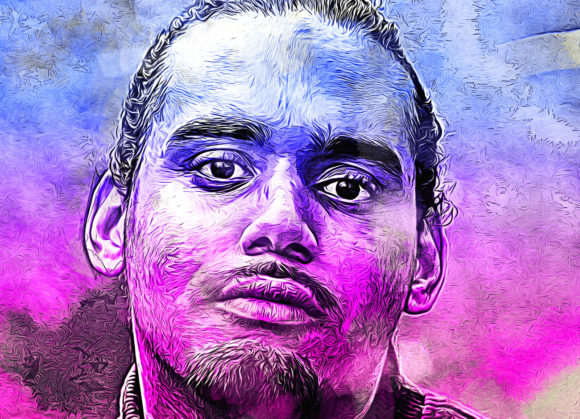
Color Blast Photoshop Action: A Practical Evaluation for Creative Workflows
In the fast-paced world of digital design, efficiency often dictates the quality of output. Designers, photographers, and content creators are constantly searching for tools that bridge the gap between high-end artistic effects and rapid production timelines. The Color Blast Photoshop Action emerges as a specialized tool designed to meet this specific need. Rather than relying on manual layering, complex masking, or hours of color grading, this action promises to transform ordinary photographs into vibrant, high-contrast visuals with a distinct "color blast" aesthetic. For professionals managing tight deadlines or hobbyists looking to elevate their portfolio without mastering advanced compositing techniques, understanding the utility and limitations of this asset is crucial.
Understanding the Core Functionality
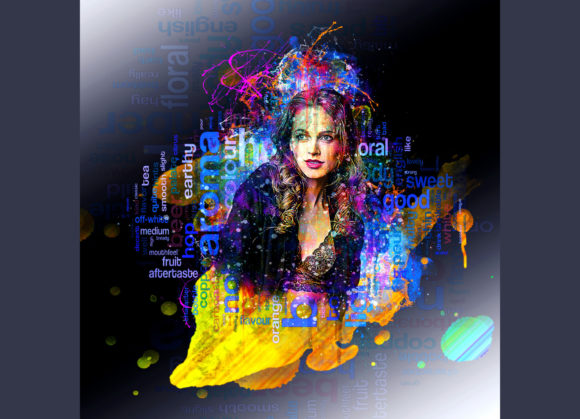
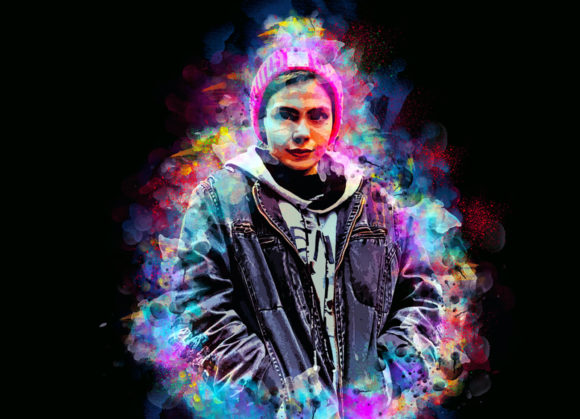
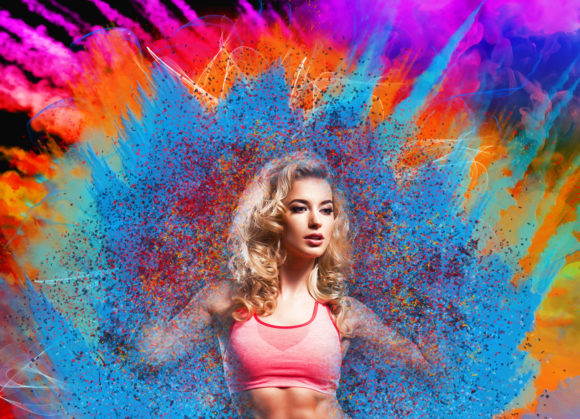
At its essence, the Color Blast Photoshop Action is a non-destructive automation script for Adobe Photoshop. It is engineered to apply a sophisticated series of adjustments, blending modes, and color overlays to an image, resulting in a dynamic, saturated look that draws immediate attention. The primary value proposition here is not just the visual effect itself, but the consistency and speed with which it can be applied.
The action operates by analyzing the underlying image data and applying a predefined set of instructions. What sets this particular pack apart is its flexibility. Upon installation, users gain access to ten different color options. This variety allows for significant customization, ensuring that the effect does not feel repetitive across a large batch of images. Whether the goal is to create a warm, inviting tone for lifestyle photography or a cool, edgy vibe for urban streetwear marketing, the ability to switch palettes instantly adds substantial workflow value.
Technical Compatibility and System Requirements
Before integrating any new tool into a professional pipeline, compatibility is a primary concern. The Color Blast Photoshop Action has been rigorously tested to ensure stability across a wide range of Adobe Photoshop versions. It is fully compatible with the English versions of Photoshop CS5.5, CS6, CC2014, CC2015, CC2015.5, CC2016, CC2017, CC2018, CC2019, and CC2020. This broad support spectrum is particularly beneficial for agencies or freelancers who may still be operating on older, stable versions of the software for legacy project reasons.
It is important to note that the action is optimized for English versions of the software. Users running localized versions may encounter errors if layer names do not match the script’s expectations. Therefore, ensuring your workspace is set to English is a critical preliminary step for seamless operation.
Workflow Integration and Best Practices
To achieve the highest quality results, proper preparation of the source image is essential. The action is not a magic fix for poorly composed or low-resolution files; rather, it enhances well-prepared canvases. Following the included user guide, there are specific steps recommended to maximize effectiveness.
First, canvas extraction and resizing play a pivotal role. For optimal performance, it is advised to select the background image and use the crop tool to extend the canvas on two sides or all sides. Resizing the image to approximately 3000x3000 pixels at 72 DPI provides enough pixel density for the action to render smooth gradients and sharp details without overburdening system resources. This step ensures that the color transitions remain crisp, avoiding the pixelation that can occur when actions are applied to undersized files.
Secondly, the interaction between the action and user input is key. The process requires the creation of a new layer named “paint” (in lowercase). This layer serves as the map for the effect. By selecting a brush and painting over specific areas of the image on this layer, the user dictates where the color blast effect should be most prominent. Once the painting is complete, hiding the “paint” layer and running the action allows the script to interpret those brush strokes as intensity masks. This method offers a high degree of control, allowing the creator to highlight subjects, backgrounds, or specific textures selectively.
Quality, Customization, and Usability
The Color Blast Photoshop Action is designed with a non-destructive workflow in mind. This means that the original image data remains intact, and all effects are applied via adjustment layers and smart objects. For professional editors, this is a non-negotiable feature. It allows for post-application tweaks, such as adjusting opacity, modifying blend modes, or fine-tuning color balance, without permanently altering the source file.
The package includes not only the ATN (action) files but also custom brushes, a PDF help file, and a comprehensive user guide. The inclusion of organized layers within the final output ensures that even after the action is run, the file structure remains clean and navigable. This organization is vital for collaborative environments where multiple designers might need to edit the same file.
Usability is further enhanced by the ease of installation. The process is straightforward, requiring minimal technical knowledge. For entrepreneurs and small business owners who may not have dedicated IT support, the ability to install and start using the tool immediately reduces friction and accelerates the return on investment.
Real-World Applications and Target Audience
Who benefits most from the Color Blast Photoshop Action? The utility spans several creative disciplines. Marketing professionals and social media managers can leverage this tool to create eye-catching thumbnails and promotional graphics that stand out in crowded feeds. The high-contrast, vibrant nature of the effect is particularly effective for stopping the scroll on platforms like Instagram and Pinterest.
Photographers, especially those specializing in portrait, fashion, or urban photography, can use this action to add a stylistic edge to their portfolios. It offers a quick way to experiment with different moods and tones during the editing phase, allowing for rapid prototyping of concepts before committing to a final grade.
Educators and bloggers can also find value in this tool. When creating visual content for articles or course materials, consistent and professional-looking imagery helps maintain brand identity. The ability to apply a uniform look across multiple images with minimal effort supports cohesive visual storytelling.
Potential Limitations and Considerations
While the Color Blast Photoshop Action offers significant advantages, it is not without limitations. The effectiveness of the result is heavily dependent on the quality of the initial "paint" layer. Users who apply brush strokes haphazardly may find the output uneven or overly saturated in unintended areas. Mastery of the brush tool and an understanding of light and shadow are still required to guide the action effectively.
Additionally, while the action supports a wide range of Photoshop versions, users on very old hardware may experience slower processing times due to the complexity of the calculations involved in generating the color blasts. Ensuring that the system meets the recommended specifications for the installed version of Photoshop is advisable.
Finally, the aesthetic produced by this action is bold and dramatic. It may not be suitable for projects requiring subtle, naturalistic color correction. It is best utilized when the creative brief calls for impact, energy, and heightened visual interest.
Final Verdict on Value and Efficiency
The Color Blast Photoshop Action represents a solid investment for creatives seeking to streamline their editing process without sacrificing quality. Its strength lies in its balance of automation and control. By providing ten distinct color options and a non-destructive framework, it empowers users to experiment freely while maintaining professional standards.
For those willing to invest a small amount of time in learning the preparatory steps—specifically canvas resizing and strategic painting—the payoff is a significant reduction in editing time and a noticeable uplift in visual appeal. In an industry where time is money, tools that deliver consistent, high-quality results with minimal friction are invaluable. This action fits seamlessly into modern creative workflows, offering a reliable solution for transforming ordinary images into extraordinary visual assets.