Transforming Photos with a Halftone Comic Effect Photoshop Action
There is a distinct charm to the visual language of vintage comics. The bold lines, the limited color palettes, and specifically, the halftone dots that create shading and depth evoke a sense of nostalgia and artistic flair. For designers, photographers, and content creators, replicating this look manually in Adobe Photoshop can be a tedious process involving multiple filters, layer adjustments, and precise color separations. This is where a dedicated Halftone Comic Effect Photoshop Action becomes an invaluable tool. It bridges the gap between complex manual editing and instant creative results, allowing users to transform ordinary photographs into extraordinary comic-style artwork with just a few clicks.
Why Automate the Halftone Process?
The primary appeal of using a pre-built action lies in efficiency and consistency. Creating a authentic halftone effect requires more than just applying a filter. It involves understanding how light and shadow translate into dot patterns, managing color channels, and ensuring the final output remains high-quality and printable or web-ready. A professional Halftone Comic Effect Photoshop Action handles these technical nuances behind the scenes. By automating the workflow, you save hours of trial and error. This is particularly beneficial for freelancers and small business owners who need to produce high-volume content without sacrificing quality. Instead of spending thirty minutes tweaking settings for a single image, you can achieve a polished result in seconds, freeing up time for other creative tasks or client communications.
Real-World Applications for Creators and Businesses
The versatility of this tool extends far beyond simple hobbyist projects. Different professionals can leverage this effect to solve specific visual communication challenges.
Social Media and Digital Marketing
In the crowded landscape of social media, stopping the scroll is essential. Standard photography often blends into the background noise. Applying a Halftone Comic Effect Photoshop Action to product shots or promotional graphics creates immediate visual interest. For example, a coffee shop might use this effect on images of their new seasonal latte to create a playful, retro-themed campaign. The stylized look distinguishes the brand from competitors using standard high-resolution food photography. Marketers can quickly generate variations using the ten different color options included in the pack, allowing them to A/B test which aesthetic resonates more with their audience.
Educational Materials and E-Learning
Educators and instructional designers often struggle to make dry content engaging. Comics are a proven medium for storytelling and information retention. By converting historical photos, scientific diagrams, or case study images into comic-style visuals, teachers can create more approachable and memorable learning materials. A history teacher could transform black-and-white archival photos into vibrant comic panels to help students connect emotionally with the subject matter. The non-destructive nature of the action ensures that the original educational assets remain intact, allowing for easy revisions if curriculum needs change.
Personal Branding and Portfolios
For artists, writers, and creative entrepreneurs, personal branding is about standing out. Using a consistent visual style across your website, business cards, and social profiles helps build recognition. A photographer might use the Halftone Comic Effect Photoshop Action to create a unique "behind the scenes" section on their portfolio, showing the raw vs. styled versions of their work. This not only showcases their editing skills but also adds a layer of personality to their professional presence. The ability to customize colors means the effect can be tailored to match existing brand guidelines, ensuring cohesion across all platforms.
Understanding the Workflow and Customization
While the action automates the heavy lifting, understanding the preparation steps is crucial for achieving the best results. The instructions provided with the pack emphasize a specific workflow designed to optimize the output. First, expanding the canvas area is recommended. This step ensures that the halftone pattern has enough space to breathe and prevents awkward cropping at the edges. Resizing the image to 2000x2000 pixels at 72 DPI is a standard practice for web-based content, balancing quality with file size.
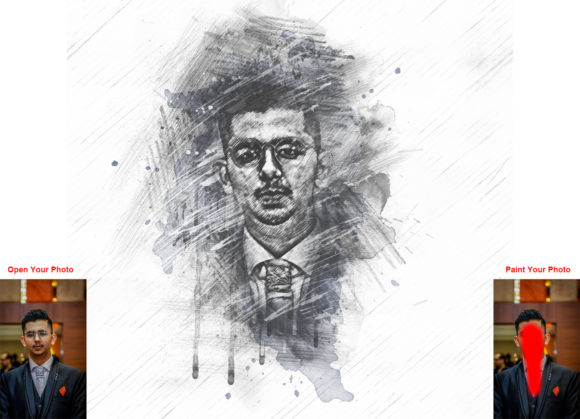
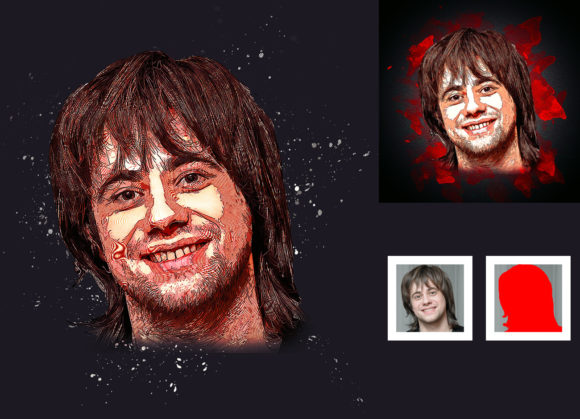
One of the most innovative features of this particular action is the "paint" layer requirement. Users are instructed to create a new layer named "paint" in lowercase and use a brush to manually paint over areas of the image they want to highlight or alter. This step introduces a level of artistic control that fully automated filters lack. By closing the eye of the paint layer before running the action, the software uses this hidden map to determine how the halftone dots should be applied. This allows for selective emphasis, guiding the viewer’s eye to specific parts of the composition. It transforms the tool from a simple filter into a collaborative partner in the creative process.
Color Versatility and Non-Destructive Editing
The inclusion of ten different color options significantly expands the utility of the action. Rather than being stuck with a single cyan-magenta-yellow-black (CMYK) separation, users can experiment with monochromatic schemes, duotones, or vibrant pop-art palettes. This flexibility is essential for matching the mood of the project. A serious editorial piece might benefit from a subdued, two-tone scheme, while a music festival poster might require high-contrast, neon colors. Because the effect is non-destructive, users can toggle between these color options instantly without losing the original image data. This encourages experimentation and reduces the fear of making mistakes, fostering a more playful and productive creative environment.
Compatibility and Technical Considerations
Before investing time in learning a new tool, it is important to ensure it fits into your existing technical ecosystem. This Halftone Comic Effect Photoshop Action is designed to work with a wide range of Adobe Photoshop versions, from CS5.5 up to CC2020. This broad compatibility is a significant advantage for users who may not have the latest subscription updates or who work in environments with standardized software versions. However, it is crucial to note that the action is tested specifically on English versions of the software. Users with localized versions of Photoshop may encounter errors if the layer names or menu commands do not match the expected English terms. Therefore, ensuring your software language setting is correct is a vital pre-check.
The package includes not just the ATN file, but also custom brushes, a help file, and a PDF guide. These resources are essential for users who are new to Photoshop actions. The organized layer structure generated by the action allows for further fine-tuning. If the default dot size or contrast isn't quite right, users can dive into the individual layers to make minor adjustments. This balance between automation and accessibility makes the tool suitable for both beginners looking for quick wins and experienced designers seeking a solid foundation for more complex manipulations.
Making the Right Choice for Your Creative Needs
When considering whether to download or purchase this action, reflect on your current workflow pain points. If you find yourself repeatedly trying to recreate comic effects and struggling with consistency, this tool offers a standardized solution. It is not just about saving time; it is about elevating the quality of your output. The professional pack ensures that the halftone dots are clean, the colors are balanced, and the overall aesthetic is polished. For those who value ease of use, the simple installation process and clear user guide reduce the learning curve significantly.
Ultimately, the Halftone Comic Effect Photoshop Action is more than a filter; it is a creative catalyst. It invites users to see their photos through a different lens, encouraging experimentation with style and narrative. Whether you are designing a zine, creating social media content, or simply exploring digital art, this tool provides the technical support needed to bring your vision to life efficiently and effectively. By integrating this action into your toolkit, you gain the ability to produce high-quality, stylized imagery that captures attention and communicates your unique creative voice.