Creating Botanical Art with Rose Stamps for Procreate: A Practical Guide to Digital Brushes and Palettes
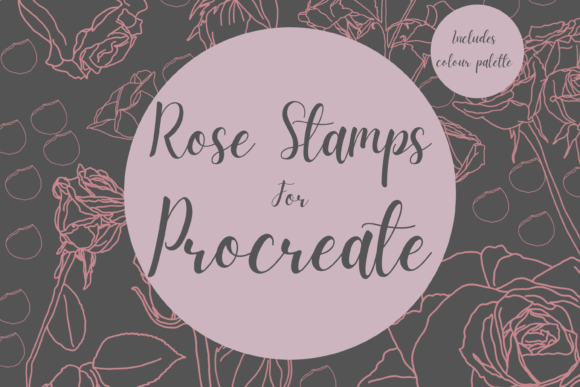
Digital illustration has evolved significantly, moving from complex vector paths to intuitive, texture-rich workflows that mimic traditional media. For artists working within the iPad ecosystem, the Rose Stamps for Procreate Palette represents a specific niche of tools designed to streamline the creation of botanical artwork. This collection of instant download hand-drawn digital brushes offers a bridge between quick design execution and detailed artistic expression. Understanding how these tools fit into a broader creative workflow is essential for designers, hobbyists, and professional illustrators alike.
The core appeal of this brush pack lies in its versatility. It includes twelve unique individual digital brushes specifically engineered to create beautiful botanical imagery. Unlike standard round or square brushes that require significant manual effort to shape into organic forms, these stamps provide pre-defined structures. However, they are not rigid clip-art replacements. Instead, they function as foundational elements that can be resized, recolored, and layered to produce unique compositions. This distinction is crucial for users evaluating whether such a tool aligns with their creative goals.
Understanding the Workflow: Stamps vs. Traditional Brushing
When comparing stamp-based brushes to traditional painting tools, the primary difference is efficiency versus control. Traditional watercolor brushes in Procreate require the user to build form through stroke direction, pressure sensitivity, and layer management. This approach offers maximum artistic freedom but demands a higher skill level and more time. In contrast, the Rose Stamps for Procreate Palette allows users to place complex shapes instantly. This makes them particularly suitable for projects where speed and consistency are prioritized, such as creating patterned wrapping paper, greeting cards, or print-on-demand goods.
However, the utility of these stamps extends beyond simple placement. A recommended technique for achieving a more authentic watercolor illustration look involves using the stamp as a guide rather than the final image. By placing a stamp, reducing its opacity, and then painting over it on additional layers, artists can combine the structural accuracy of the stamp with the organic variability of hand-painting. This hybrid approach mitigates the "cookie-cutter" feel that can sometimes plague digital stamp usage, resulting in artwork that retains a human touch while benefiting from digital precision.
Integration with Textures and Clipping Masks
To maximize the potential of these digital brushes, integration with other Procreate features is necessary. The stamps work exceptionally well when combined with textures and clipping masks. For instance, applying a paper texture overlay can soften the digital edges of the stamp, making it appear as though it was printed on rough stock. Clipping masks allow users to restrict color changes to the shape of the stamp without affecting the surrounding canvas. This non-destructive editing capability is a significant advantage over static clip art, which often requires external software like Photoshop for similar modifications.
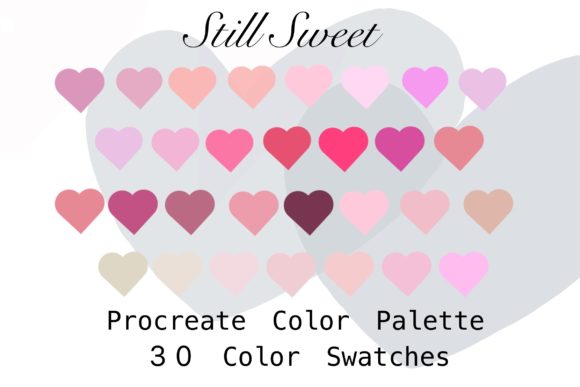
The inclusion of a ‘Delicate Rose’ colour palette swatch further enhances this workflow. Color harmony is often a challenging aspect of digital design, especially for those who do not have a strong background in color theory. By providing a curated set of hues that complement the botanical theme, the package reduces the cognitive load on the designer. Users can experiment with different tonal variations knowing that the colors are pre-selected to work together, ensuring a cohesive aesthetic across multiple elements.
Evaluating Suitability: Who Should Use These Tools?
Determining whether the Rose Stamps for Procreate Palette is the right choice depends largely on the user’s intended output and technical setup. These files are digital brushes that function exclusively within the Procreate app. Consequently, they are not suitable for users who prefer desktop-based software like Adobe Illustrator or Affinity Designer. Additionally, the requirement for an Apple Pencil and an iPad Pro (or compatible iPad model) means that there is a hardware barrier to entry. Without this specific ecosystem, the brushes cannot be utilized.
For DIY enthusiasts and small business owners creating printed goods, these tools offer a compelling value proposition. The ability to resize and recolor elements means that a single purchase can generate hundreds of unique designs. Whether creating invitations for weddings, scrapbooking layouts, or wall art for home decor, the flexibility of the brushes allows for customization that static PNG clip art cannot match. Static images often lose quality when scaled up, whereas vector-like scalability in Procreate brushes maintains clarity, provided the canvas resolution is set correctly.
On the other hand, professional illustrators seeking complete originality may find stamp-based tools limiting. While the brushes can be modified, the underlying shape remains consistent across uses. For high-end editorial illustrations or unique brand identities where distinctiveness is paramount, custom-drawn elements may still be necessary. In such cases, these stamps might serve better as mood board references or under-sketches rather than final assets.
Technical Considerations and File Management
From a technical standpoint, managing digital downloads requires a certain level of organizational discipline. To download and install the files, users need a platform capable of handling zip files, such as iCloud, Dropbox, or Google Drive. The process involves downloading the file to the iPad, unzipping it, and then importing the .brushset file into Procreate. While straightforward for experienced users, this can be a hurdle for beginners unfamiliar with iOS file management. Clear instructions are typically provided by creators, but the reliance on third-party cloud storage means that internet connectivity is required during the setup phase.
Another consideration is the learning curve associated with Procreate itself. While the app is known for its intuitive interface, mastering features like layer blending modes, opacity adjustments, and transformation tools takes practice. Users who are new to digital art may need to invest time in tutorials to fully leverage the capabilities of the Rose Stamps for Procreate Palette. However, for those already comfortable with the app, these brushes can significantly accelerate the design process.
Comparing Alternatives: When to Look Elsewhere
In the broader market of digital art resources, alternatives to stamp-based brushes include vector libraries, procedural generation tools, and hand-drawn clip art packs. Vector libraries offer infinite scalability and are ideal for logo design or large-format printing, but they often lack the textured, organic feel of watercolor. Procedural tools can generate endless variations but often require complex node-based setups that are not available in Procreate. Hand-drawn clip art packs provide ready-to-use images but lack the interactivity and customization options of live brushes.
The Rose Stamps for Procreate Palette occupies a middle ground. It offers more flexibility than static clip art and more speed than pure hand-painting. For users who need to produce a high volume of botanical-themed designs with a consistent aesthetic, this approach is highly efficient. However, if the goal is to create abstract art or non-botanical subjects, these specialized brushes will have limited utility. It is important to assess the breadth of one’s project needs before committing to a niche toolset.
Ultimately, the decision to use these brushes should be guided by the specific requirements of the project. If the work involves repetitive botanical motifs, such as floral borders or patterned backgrounds, the efficiency gains are substantial. If the project demands unique, one-off illustrations with complex narratives, the time saved by using stamps may be offset by the effort required to customize them sufficiently. By weighing these factors, artists can make an informed choice that balances creative vision with practical constraints.
In conclusion, the Rose Stamps for Procreate Palette serves as a powerful resource for digital crafters and designers working within the iPad ecosystem. Its strength lies in the balance between ease of use and creative flexibility, allowing for both rapid prototyping and detailed refinement. By understanding the technical requirements, workflow integrations, and comparative advantages, users can effectively determine if this tool aligns with their artistic objectives. Whether for personal DIY projects or commercial print-on-demand ventures, these brushes offer a viable pathway to creating elegant, botanical-inspired digital art.