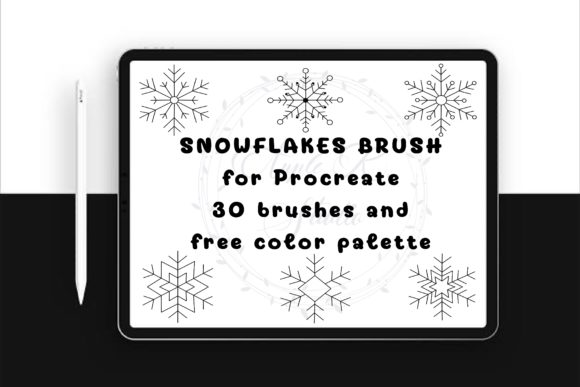
Creating Winter-Themed Digital Art with Snowflake Stamp Brushes for Procreate
Digital illustration has evolved significantly, offering artists tools that bridge the gap between traditional hand-drawn aesthetics and the efficiency of modern software. For iPad users working within the Procreate ecosystem, stamp brushes represent a unique category of resources designed to streamline workflow while maintaining artistic integrity. Among these, the Snowflake Stamp Brush for Procreate stands out as a specialized tool for seasonal design, holiday graphics, and whimsical doodles. Understanding how these digital assets function, their specific advantages, and where they fit within a broader creative toolkit is essential for designers looking to optimize their production process without sacrificing quality.
Understanding the Function and Design of Snowflake Stamps
At its core, a snowflake stamp brush is a pre-rendered digital asset imported into Procreate as a custom brush file. Unlike standard painting brushes that rely on pressure sensitivity and stroke dynamics to create marks, stamp brushes place a complete, static image onto the canvas with a single tap. The specific set featuring thirty distinct snowflake designs offers a curated library of winter motifs, ranging from simple geometric crystals to more intricate, lace-like patterns. This variety allows artists to layer different shapes, creating depth and visual interest that would be time-consuming to achieve manually.
The inclusion of a free color palette alongside the brush set addresses a common friction point in digital design: color selection. By providing thirty coordinated colors, the resource ensures that the snowflakes can be integrated seamlessly into existing projects or used as a starting point for new compositions. This combination of shape variety and color coordination makes the tool particularly useful for creators who need to produce consistent thematic elements quickly, such as those designing social media content, digital stickers, or printable worksheets.
Evaluating Efficiency Versus Custom Illustration
When considering whether to incorporate stamp brushes into your workflow, it is important to weigh the tradeoffs between speed and customization. Hand-drawing each snowflake individually allows for complete control over every line and curve, resulting in a truly unique piece. However, this approach is labor-intensive and may not be feasible for projects with tight deadlines or high volume requirements, such as creating a series of holiday-themed wallpapers or a large batch of digital stickers.
In contrast, using a Snowflake Stamp Brush for Procreate drastically reduces the time required to populate a scene with decorative elements. The ability to scale, resize, and adjust the opacity of each stamp provides a degree of flexibility that mitigates the "cookie-cutter" look often associated with stamps. By varying the size and transparency, artists can simulate perspective and depth, making the stamped elements feel like an organic part of the composition rather than mere overlays. This balance of efficiency and adjustability makes stamp brushes an ideal solution for background elements, border decorations, and filler details that support the main subject of an illustration.
Compatibility and Technical Considerations
One critical factor in evaluating any digital asset is its compatibility with your existing hardware and software. This particular brush set is designed exclusively for the Procreate app on iPad. It is distributed as a .brushset file, which imports directly into the Procreate brush library. Users should note that these files will not function in other digital art applications such as Adobe Fresco, Photoshop, or Clip Studio Paint. For artists who work across multiple platforms, this limitation means the resource is strictly tied to the Apple iPad ecosystem.
The installation process is straightforward: users download the ZIP file, extract the .brushset, and import it into Procreate. Once installed, the brushes appear in the user’s library, ready for immediate use. The simplicity of this process is a significant advantage, as it requires no complex configuration or technical expertise. However, users must ensure they are running a compatible version of Procreate to avoid potential import errors. Additionally, because the brushes are raster-based, scaling them up significantly beyond their original resolution may result in pixelation. Therefore, it is advisable to use them at sizes close to their intended display dimensions or to vectorize them externally if large-format printing is required.
Practical Applications and Use Cases
The versatility of snowflake stamp brushes extends beyond simple holiday cards. Here are several practical scenarios where these tools prove particularly effective:
- Digital Stickers and Planner Decor: The cute, doodle-style aesthetic of these snowflakes makes them perfect for creating digital sticker packs. Users can combine different snowflake shapes with text or other elements to create unique designs for digital planners and journals.
- Educational Worksheets: Teachers and educational content creators can use these stamps to add visual appeal to winter-themed worksheets, activity sheets, and classroom decorations. The clean lines and simple shapes are easily recognizable and engaging for students.
- Social Media Graphics: For marketers and influencers, quick turnaround times are essential. These brushes allow for the rapid creation of festive backgrounds and accents for Instagram stories, posts, and Pinterest pins, helping to maintain a consistent seasonal theme across platforms.
- Logo and Branding Elements: While not suitable for complex corporate logos, these snowflakes can serve as charming accents for small business branding, particularly for boutiques, bakeries, or craft shops looking to convey a cozy, winter vibe.
Comparing Stamp Brushes to Other Digital Resources
When exploring alternatives to stamp brushes, artists often consider vector libraries, PNG clipart packs, or procedural generation tools. Each option has distinct characteristics that may better suit specific needs.
Vector Libraries: Vector files offer infinite scalability and are ideal for print design. However, they require software like Adobe Illustrator or Affinity Designer to edit and manipulate. For Procreate users, importing vectors involves additional steps and may not integrate as smoothly into the painting workflow as native brushes.
PNG Clipart Packs: Similar to stamp brushes, PNGs are pre-made images. However, using them requires importing each file individually as a separate layer, which can clutter the layer panel and slow down the workflow. Stamp brushes, by contrast, allow for rapid placement and immediate adjustment of size and opacity within the same interface, offering a more streamlined experience.
Procedural Tools: Some advanced software offers procedural snow generators that create unique, non-repeating patterns. While powerful, these tools often have a steep learning curve and may lack the specific "cute" or hand-drawn aesthetic that many illustrators seek for personal or commercial projects. The Digital Doodle Cute Snowflake brushes provide a curated, artistic style that procedural tools may not replicate without significant customization.
Making the Right Choice for Your Workflow
Deciding whether to invest in a snowflake stamp brush set depends on your specific creative goals and workflow preferences. If you frequently create seasonal content, value efficiency, and work primarily within Procreate, this tool offers a compelling return on investment. The instant download format and ease of use make it accessible for both beginners and experienced professionals.
However, if your work requires precise vector scalability, cross-platform compatibility, or highly customized, one-of-a-kind illustrations, you may find that manual drawing or vector-based resources better suit your needs. It is also worth considering the frequency of your winter-themed projects. For occasional use, free resources or manual drawing might suffice, but for regular content creation, the time saved by using a dedicated stamp brush set can be substantial.
Ultimately, the Snowflake Stamp Brush for Procreate serves as a specialized tool that enhances productivity without compromising on aesthetic appeal. By understanding its strengths, limitations, and best-use scenarios, artists can make an informed decision about whether it aligns with their creative objectives. As with any digital resource, the key is to integrate it thoughtfully into your workflow, using it to complement your skills rather than replace them.